
SynOne Smart Building Series
SynOne Parking — Parking Management
License Plate · Gates · Fees · On-premise
A car reaches the lane, the camera reads the plate and the system records the time and a photo. It decides whether this is a monthly pass, a visitor, a blacklisted car or one that has not paid — opening the gate for the ones that should pass and stating the reason for the ones that should not. Passes, leases, hourly fees, vouchers and reports share one console.
01Who it is for
-
Basement car parks in residential and office buildings
Residents, staff and monthly parkers register their plates and skip the ticket; expired passes revert to hourly automatically. Leases, tenants and rents are kept here too.
-
Car parks that charge by the hour
Free minutes, billing unit, rate and daily cap are all configurable; a car leaving within the grace period after paying is not charged again.
-
Sites that already run access control and want parking alongside
Gates hang off the access controllers, sharing permissions and audit trail with SynOne Access. Buy parking on its own or alongside other modules.
The plate camera verified in practice is the SOYAL AR-901A01 (pushing results over TCP); gates are driven by an access controller relay. For other camera or gate brands we check the format first. There is no online payment integration — hourly fees are taken in cash at the management office and recorded.
02Architecture
Cameras push plate reads to the parking service; once it decides, the command travels through the access service to the controller that opens the gate. Parking runs as its own service, so restarting it leaves access control and other modules alone.
Lane Equipment
- Plate-recognition cameras
- Gates (controller relays)
- Lane CCTV
SynOne Parking
- Read merging · noise filtering
- Pass decisions · auto gate
- Passes · leases · blacklist
- Hourly fees · vouchers
- Capacity · exception count
Use and Output
- Lane monitor and cashier desk
- Fee lookup on the lobby kiosk
- Parking reports
- Photos and pass history
Installed on a server on site, so plates and photos stay there. Free spaces are inferred from plate entries and exits, not from per-bay sensors.
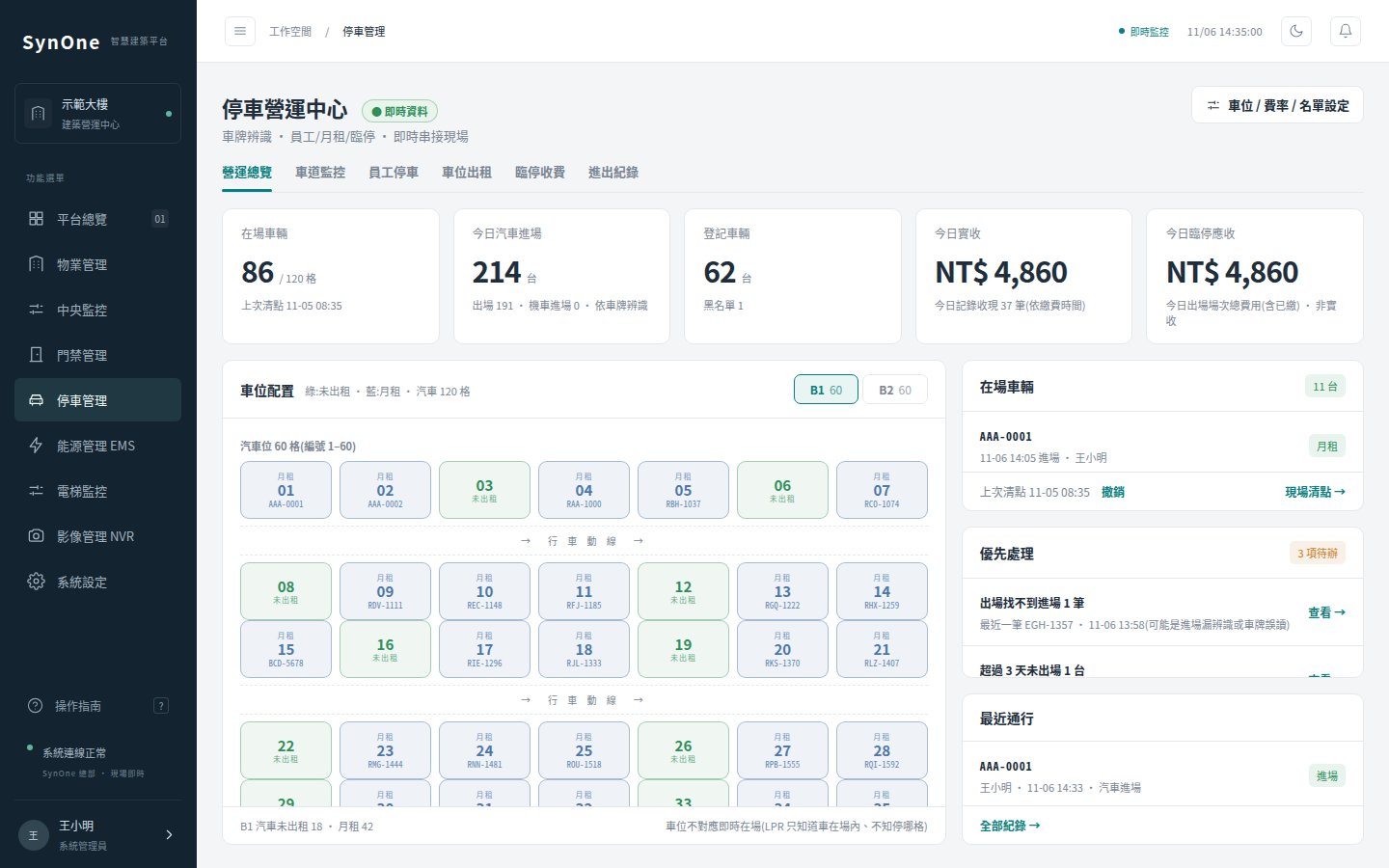
03Product screens
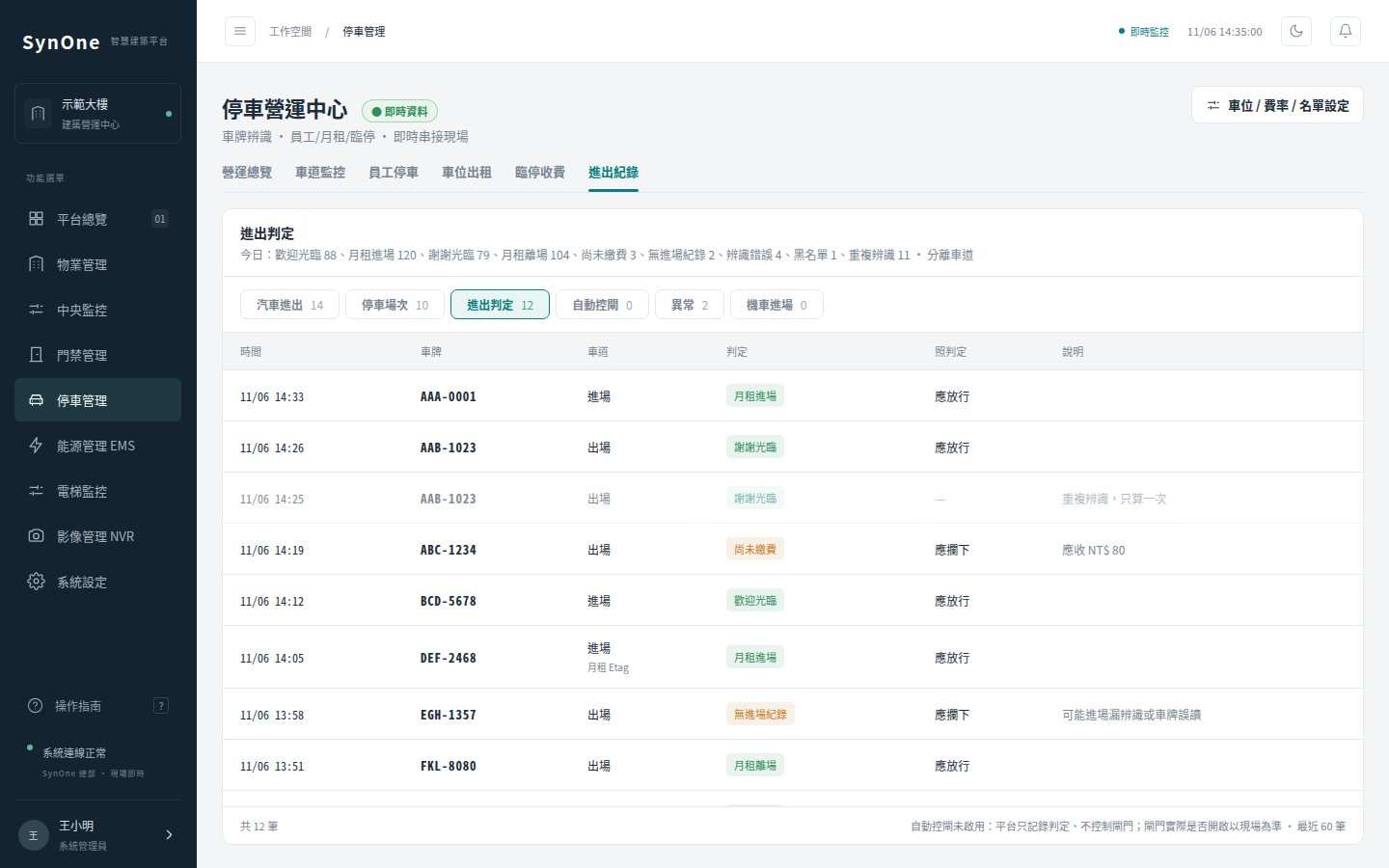
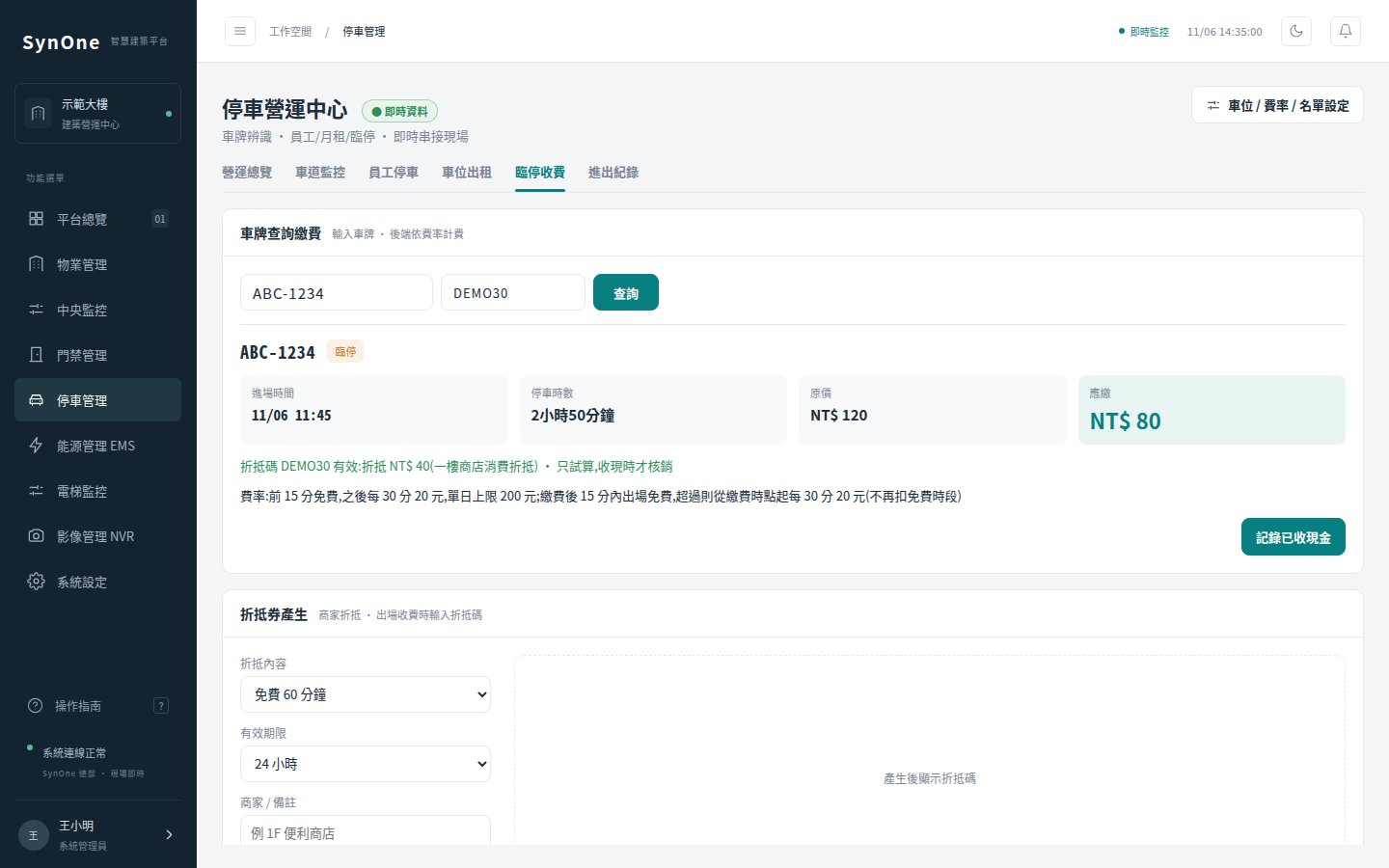
04Core features
A reason for every pass
Welcome, monthly entry, car park full, blacklisted, unpaid, exit window exceeded, no entry on record — every pass records the system’s decision, and repeat reads of the same car are marked separately.
Auto gate with a dry run
Three modes: off, dry run (log what would have opened) and on. Run the dry run, compare the log, then switch it on; the same plate never opens the gate twice within 60 seconds.
Noise filtering
Several frames of the same car collapse into one read; single-frame glitches and reads that do not match a Taiwanese plate are dropped. On a shared lane, the order the two cameras see the car decides its direction.
Correcting exceptions in one go
Lists cars parked over three days and exits with no entry; after a walk-round count, the manager corrects the on-site total in one step — and can undo it.
05Specifications
Parking can be bought on its own or combined with access control and property management on one platform.
| Function | What it covers | Notes |
|---|---|---|
| Plate entry and exit | Read merging, noise filtering, photos, cars and motorcycles logged separately | One record per plate per camera within five minutes; motorcycles are logged on entry only and not charged. |
| Gate control | Open once / hold open / hold closed by hand; auto gate (off / dry run / on) | Hold open and hold closed ask for confirmation, and only users with rights to that gate see the buttons. |
| Passes and leases | Monthly, staff and resident plates with expiry and permitted hours, blacklist; space leases and rental income | Expired passes revert to hourly; leases due within 90 days are listed. |
| Hourly fees | Free minutes, billing unit (15 / 30 / 60 min), rate, daily cap, post-payment grace | At the cashier desk, entering a plate shows the amount due, calculated on the server. |
| Vouchers | Minutes off, amount off, or free; with validity hours and a printable QR code | A barcode scanner reads them straight into the payment page; each can be used once. |
| Capacity and reports | Total spaces and monthly cap, free spaces and occupancy, space list importable from floor plans; passes, dwell time, peak count, receivables | Visitors can look up their parking time and fee by plate on the lobby kiosk. |
06FAQ
Can we keep our existing plate cameras and gates?
The verified camera is the SOYAL AR-901A01, with gates switched by an access controller relay. For other brands, tell us the model; we check how it delivers plate reads first, and say plainly if it will not fit.
Can people pay online or at the kiosk?
Not at present. Hourly fees are taken in cash at the management desk after entering the plate; the lobby kiosk shows parking time and the amount due, but does not take payment.
How are free spaces counted?
From plate entries and exits, compared against total capacity; when the count reaches it, the car park is “full”. There are no per-bay sensors, which is why a walk-round correction exists.
What if automatic gate opening gets it wrong?
Auto gate is off by default. Start with the dry run: the system logs which cars it would have let through without opening the gate, and you switch it on once the log checks out. Cars it would refuse are only logged with the reason, for staff to handle.
—The SynOne series
Each product can be bought on its own; on one SynOne platform they share accounts, alarms and the same people, door and device records.
Tell us about your building
Let us know what equipment is on site and what you want to solve first; we will tell you plainly what fits and how to roll it out.
Talk to us contact@shengyiltd.com
Sold under a perpetual licence for one site and one server. Copying, reselling, reverse engineering or circumventing the licence check is prohibited and pursued under the Copyright Act. Licence terms (Chinese) →