
SynOne Smart Building Series
SynOne EMS — Energy Management
Meters · Demand · EV Billing · On-premise
It reads the meters on site, logs energy every 15 minutes and estimates cost against Taipower’s time-of-use tariff. As demand nears the contract capacity it warns; past it, it sheds the lighting, outputs or air-conditioning you choose in order, and restores them once demand falls. In residential buildings, EV charging bays can be tied to households and meters and billed monthly from automatic readings.
01Who it is for
-
Buildings that want to know where the power goes
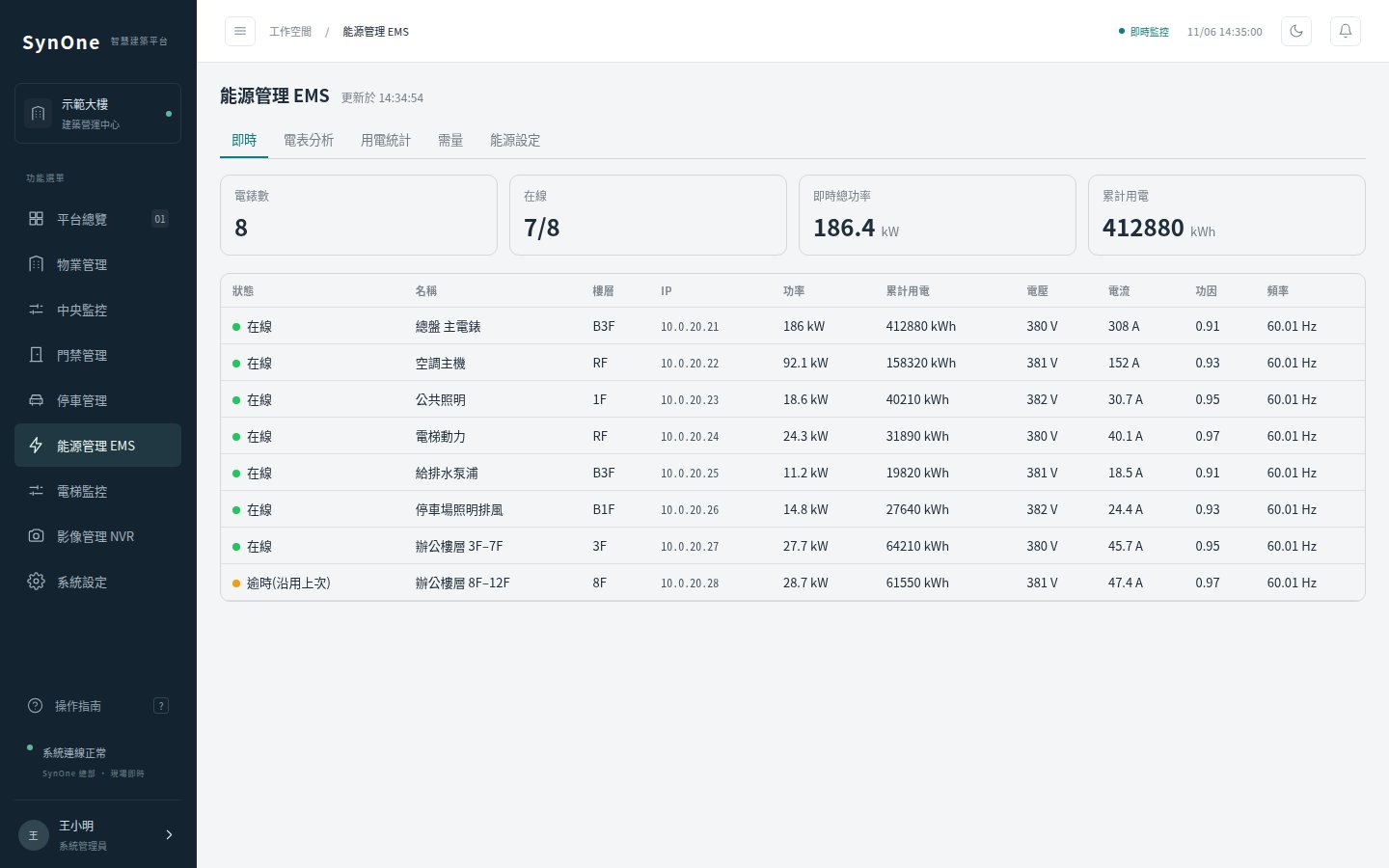
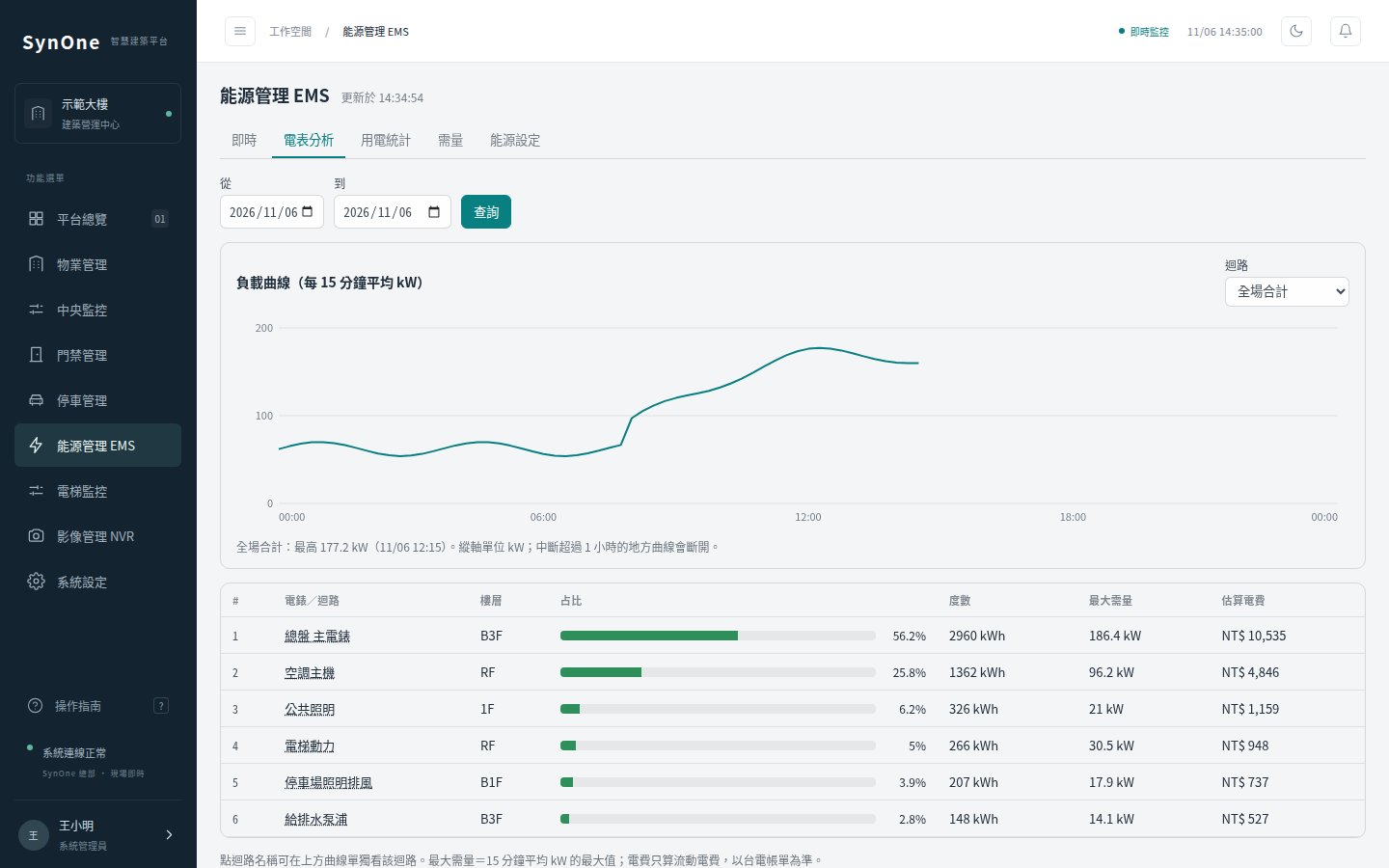
Once multi-circuit meters are connected, per-circuit ranking and share, 15-minute load profiles and peak demand are on one screen, with CSV export.
-
Sites that keep exceeding their contract demand
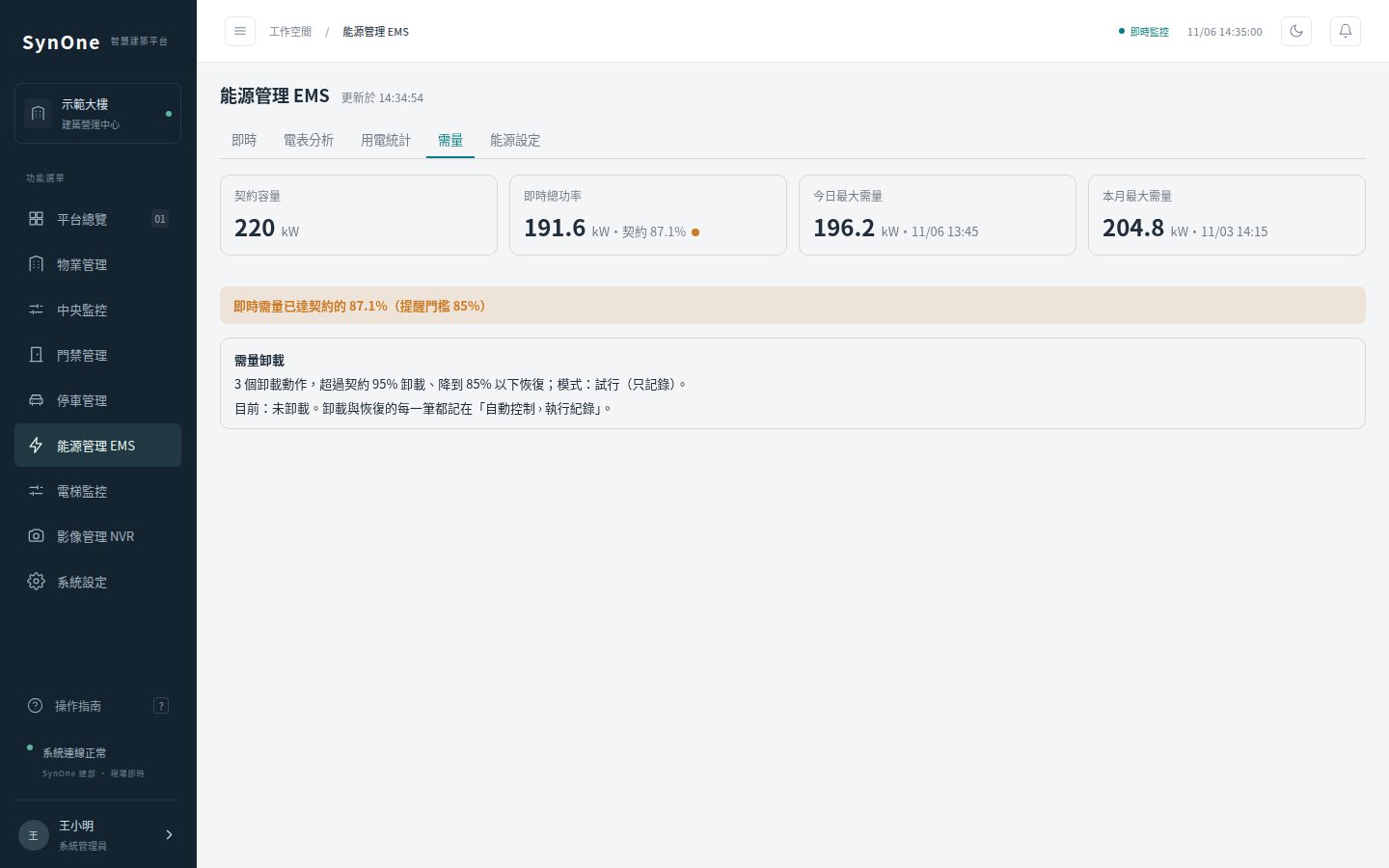
Set the contract capacity and shedding order; the dry run logs what it would shed without sending commands, so you can check the targets before switching it on.
-
Residential buildings where owners install EV chargers
Each bay is tied to a household and a meter, billed by time-of-use rate, per-kWh mark-up and a monthly base fee, with meter swaps, manual readings and payments handled. Billing runs off the meter, so any charger brand works.
Meters are read directly over Modbus TCP or Modbus RTU over TCP (via an RS485 converter); the multi-circuit meters verified in practice are DAE’s SMB series, and meters on other protocols can come in through the SynOne gateway. Air-conditioning control currently supports the Midea XYE bus via a converter. Costs are time-of-use estimates — the Taipower bill is authoritative.
02Architecture
Meters are polled by the platform directly; devices on other protocols arrive through the gateway. The energy service logs, estimates and watches demand, sends control commands when it must shed, and remembers which devices it switched off.
On Site
- Multi-circuit meters (Modbus)
- Lighting · outputs
- Air-con (XYE bus)
SynOne EMS
- Live readings · offline flags
- 15-min logs · TOU estimates
- Demand watch · staged shedding
- EV bay monthly billing
Use and Output
- Daily / monthly · load profile
- CSV export
- Household EV bills
- EV fee beside management fees
Installed on site; after a restart the platform still knows which devices it shed, so none are left off.
03Product screens
04Core features
New meters without new code
Register maps live in configuration, so a new brand or extra circuits is a settings change; one meter going offline is flagged on its own without affecting the rest.
Time-of-use estimates
Peak, mid-peak and off-peak, summer and non-summer, and public holidays are all accounted for; gaps longer than an hour are excluded rather than counted as usage.
Shedding with a dry run
Demand shedding starts in dry-run mode, logging what it would have shed; real commands are enabled only after you have checked.
EV fees beside management fees
Residents get a notification when an EV bill is issued, and the management-fee statement gains a charging column so the office can collect both together.
Prepaid charging, one session at a time
Power to the bay is switched on only after the driver tops up at the guard desk, and the meter is read every 20 seconds to deduct the charge. When the balance runs out or the car is full, power is cut and the driver gets a text to move the car, with an idle fee after a grace period. Periods when the meter cannot be read are not charged — they are logged for review.
05Specifications
EMS can be bought on its own or combined with building monitoring and property management on one platform.
| Function | What it covers | Notes |
|---|---|---|
| Meter reading | Power, kWh, voltage, current, power factor, frequency; offline flags | Modbus TCP and RTU over TCP; the screen refreshes every 10 seconds. |
| Energy reports | 15-minute logs, daily and monthly reports, load profile, circuit ranking and share, peak demand, CSV | Load profiles cover up to 31 days per query; statistics up to 400 days. |
| Demand control | Contract capacity, near-limit warning, staged shedding of lighting / outputs / air-con, automatic restore | Demand is calculated from 15-minute energy deltas; dry run by default. |
| EV bay billing | Bay tied to household and meter, automatic readings, TOU rate + per-kWh mark-up + base fee, meter swaps and manual entries, voids, payments, CSV | Billed from the meter; it does not control chargers and works with any brand. |
| Prepaid charging | One record per session, top-up limits, deduction from the meter, power cut when spent or full, text to move the car, idle fee after a grace period, early pick-up settlement | Top-ups are cash at the guard desk; full-charge detection works with the Tesla Wall Connector; power is switched through a Modbus output, in dry run by default. |
| Air-con monitoring and control | On/off, mode, temperature and fan per indoor unit; single or batch control, usable in schedules and demand shedding | Currently the Midea XYE bus via a converter. |
06FAQ
Can the cost figures be used as the bill?
We would not. The system estimates against Taipower’s time-of-use tariff for trends and comparisons between circuits; the Taipower bill is authoritative. Rates can be adjusted to your tariff plan.
Which meters are supported?
The platform reads Modbus TCP and Modbus RTU over TCP meters, with register maps in configuration. DAE’s SMB-series multi-circuit meters are verified; for other models send us the register table and we will set it up. Meters on other protocols can come in through the SynOne gateway.
Do residents need a particular charger brand?
No. Billing uses each bay’s meter reading and never talks to the charger, so any brand works. When a meter is offline, no rate is applied automatically for that period; staff enter the reading instead.
How is prepaid charging paid for?
For now the guard takes cash and tops up in the system, which then switches the bay on; online payment is not connected yet. Early pick-ups are settled by the guard. Before going live, power switching and text alerts are verified on site in dry-run mode.
Could shedding switch off something it should not?
You choose what can be shed and in what order, and it starts in dry-run mode that only logs. Once live, devices are restored automatically when demand falls, and the platform remembers what it switched off across restarts.
—The SynOne series
Each product can be bought on its own; on one SynOne platform they share accounts, alarms and the same people, door and device records.
Tell us about your building
Let us know what equipment is on site and what you want to solve first; we will tell you plainly what fits and how to roll it out.
Talk to us contact@shengyiltd.com
Sold under a perpetual licence for one site and one server. Copying, reselling, reverse engineering or circumventing the licence check is prohibited and pursued under the Copyright Act. Licence terms (Chinese) →