
SynOne Smart Building Series
SynOne — Integrated Building Platform
Access · BMS · Property · Parking · Energy · On-premise
In a typical building, access control, HVAC and lighting, parking, management fees and meters mean five vendors, five programs and five passwords. SynOne puts them on one platform — one sign-in, one set of permissions, one alarm centre — with people, doors, units and devices entered once. Switch on the modules you need and add more later without changing systems.
01Who it is for
-
Buildings consolidating several systems onto one screen
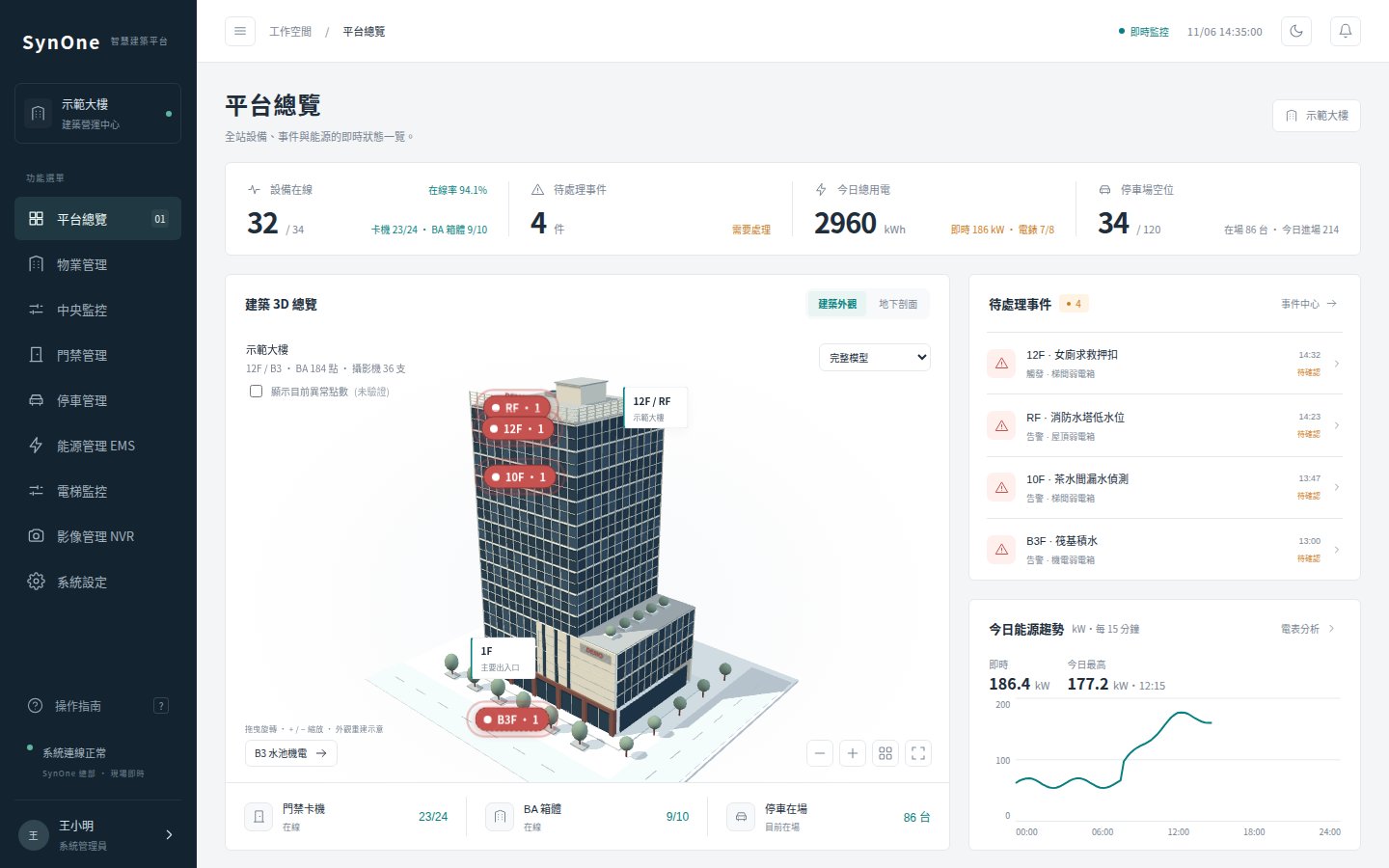
The overview shows each floor and the location of alarms on a 3D building model; access, monitoring, property, parking and energy sit in one menu instead of five logins.
-
Control rooms that need to see what needs attention now
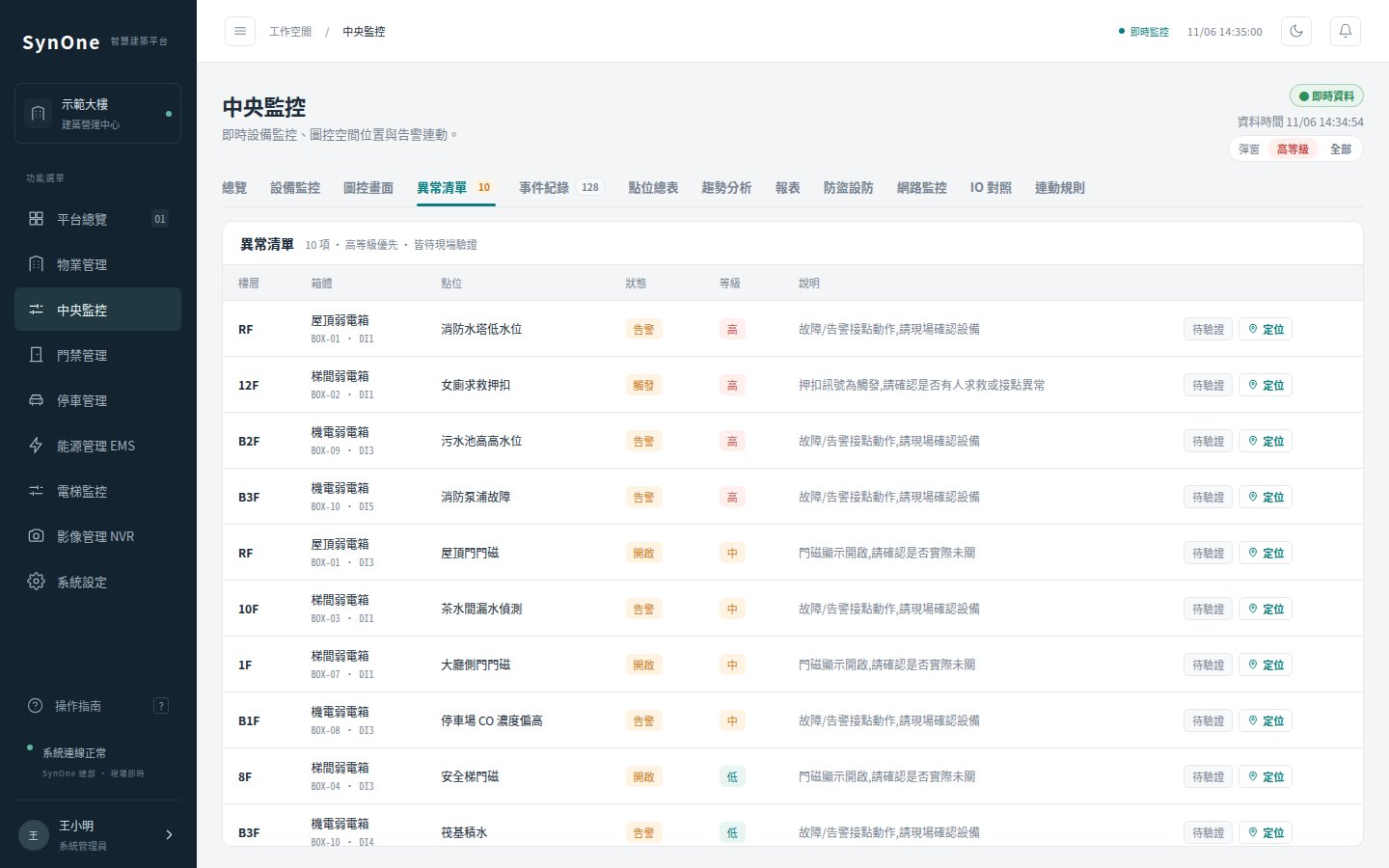
Alarms are graded, pop up full-screen with sound and open the nearest camera, and every acknowledgement is recorded; linkage rules can notify, locate and bring up video when a condition is met.
-
Integrators rolling out site after site
A new site needs no code changes: settings forms, site configuration files, Excel import of the IO point table, exportable graphic screens, and an acceptance report at handover.
SynOne is installed on the site’s own Windows server, with PostgreSQL as its database. Fire, smoke-extraction and other life-safety interlocks stay with the on-site hardware; the platform monitors, notifies and records, and does not replace them.
02Architecture
The platform core handles sign-in, permissions, alarms and reports; parking, property, access and BA run as separate services, so restarting one leaves the others running. Field devices connect through the gateway or each module’s drivers, and every module uses its own database account that can write only its own tables.
Field Devices
- Readers · lift control
- PLCs · DI/DO · meters
- Lighting · air-con
- Plate cameras · CCTV
SynOne
- Gateway: drivers · graphics
- Access · BA · property · parking
- Energy · video recognition
- Accounts · alarms · linkage
- Reports · history · backup
Use and Output
- Browser console
- Lobby kiosk
- Email · LINE · webhook
- Daily / monthly · CSV
Installed on site, so data stays there; programs, settings and every database are backed up daily, with hashes verifying each backup.
03Product screens
04Core features
Modules on demand
Access, monitoring, property, parking, energy, video recognition and other modules are switched on per licence and need; disabled modules vanish from the menu and their interfaces stay closed.
Permissions down to each door
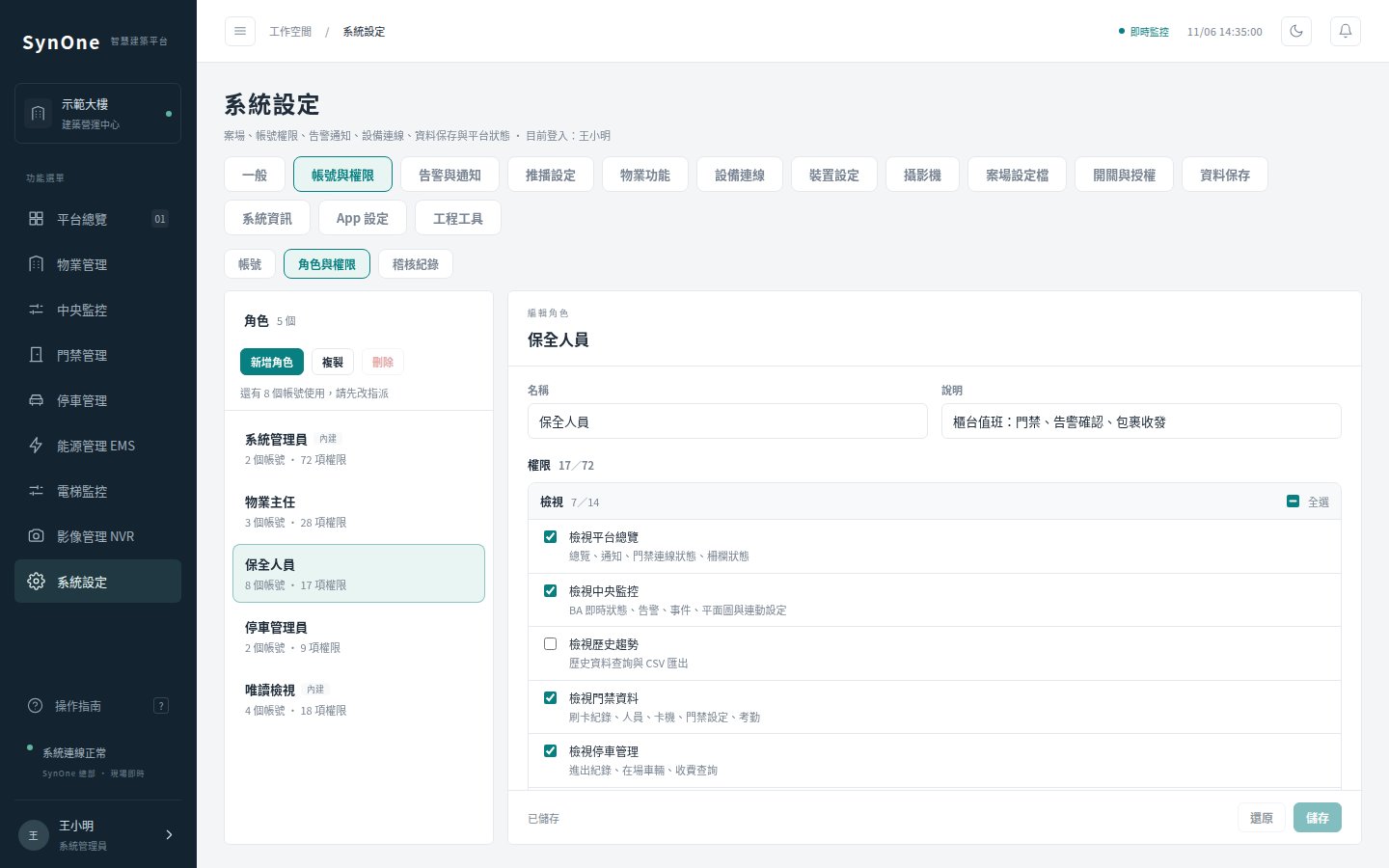
Administrator, operator and viewer roles come built in, with custom roles on top; 72 fine-grained permissions, and accounts can be limited to particular doors. Every action is written to the audit log.
Graphics and a 3D overview
Upload a floor plan (PDF works), drag icons, bind points and control equipment on the drawing; the home page builds a 3D model of the building from its floor settings and marks alarms on the floor where they happen.
Automation with a dry run
Schedules, linkage and demand shedding start by logging the commands they would have sent; real control is enabled once checked on site.
Updates that roll themselves back
Each update backs up, swaps files, restarts and runs a health check, reverting automatically if any step fails; the check covers services, databases, licence, backup freshness and disk space.
05Specifications
Shared platform capabilities below; see each product page for module functions.
| Item | What it covers | Notes |
|---|---|---|
| Accounts and sign-in | Three built-in roles plus custom roles, 72 permissions, door scoping, audit log | Five failures lock for 15 minutes; idle sessions sign out; first sign-in forces a password change. |
| Alarms and linkage | Graded alarms, full-screen pop-up, sound, nearest camera, acknowledgement; condition-triggered notification, location, video and recording | Notifications by email, LINE and webhook; control actions start in dry run. |
| Reports and history | Automatic daily and monthly reports (printable to PDF) and CSV, optionally emailed; history of points, connectivity, plates and swipes | History is kept for 400 days by default. |
| Device connectivity | Gateway drivers for Modbus TCP / RTU, BACnet/IP, Siemens S7 and MQTT; access readers, DI/DO, two-wire lighting, air-con bus, plate cameras, RTSP cameras | Each brand and model is verified on site before rollout. |
| Rollout tools | Settings forms, site configuration files, Excel import of the IO point table (preview before writing), graphics export and import, acceptance report | No code changes for a new site. |
| Server and operations | Windows server, PostgreSQL, auto-start and watchdog, daily backups (30 kept), health checks, one-step updates | Each module has its own database account; updates are run by us. |
06ROLLOUT
- 01
Survey devices and needs
List the brands, models and protocols of readers, controllers, meters and cameras on site, and decide which modules to enable.
- 02
Install the server
Install the platform, database and services on the site’s Windows server, with auto-start and daily backups.
- 03
Import points and screens
Import the IO point table from Excel, previewing the changes first; upload floor plans, place icons and bind points.
- 04
Dry run and on-site checks
Automation runs in dry-run mode first; logs are checked against what happens on site before going live.
- 05
Acceptance and handover
Produce the acceptance report and hand over accounts and permissions; health checks and daily backups keep watch from then on.
07FAQ
Do we have to buy every module?
No. Each module can be bought on its own and the platform enables it per licence; adding one later is a switch on the same platform, with no new system or data rebuild.
Where is the data? Is it a cloud subscription?
No. SynOne is a perpetual licence installed on the site’s own Windows server, with databases and video kept on site; it backs up daily and can write to a separate disk.
Can it replace fire or smoke-extraction interlocks?
No, and it should not. Life-safety interlocks stay with the on-site hardware; SynOne monitors, alarms, notifies and records so the people on duty know at once.
What happens if the licence fails or the server is copied?
The licence is bound to the server’s hardware. If it fails, only configuration changes are locked — doors, alarms and other site operations carry on — and a server or motherboard swap just needs a reissued licence from us. See the software licence terms.
—The SynOne series
Each product can be bought on its own; on one SynOne platform they share accounts, alarms and the same people, door and device records.
Tell us about your building
Let us know what equipment is on site and what you want to solve first; we will tell you plainly what fits and how to roll it out.
Talk to us contact@shengyiltd.com
Sold under a perpetual licence for one site and one server. Copying, reselling, reverse engineering or circumventing the licence check is prohibited and pursued under the Copyright Act. Licence terms (Chinese) →